
Professional Invoicing with FX Protection
Invoice in any currency—lock your margin when you send
Invoice international customers in their preferred currency. Lock the FX rate when the invoice is sent, guaranteeing your margin even if rates move unfavorably before payment arrives. Branded templates and automated reminders included.
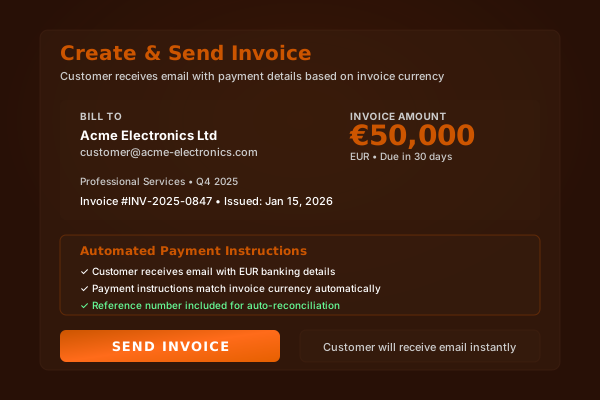
How It Works
Create Invoice
Select customer, add line items, choose their preferred currency. See real-time conversion to your base currency.
Lock FX Rate
Toggle "Lock Rate" to freeze the exchange rate when you send. Your margin is guaranteed regardless of how rates move before payment.
Send Branded Invoice
Email the invoice with your logo, colors, and payment details. Customer sees their currency; you see your base currency value.
Automated Follow-Up
System sends reminders at configurable intervals (7 days, 3 days, overdue). Track payment status and history in the dashboard.
Key Benefits
Real-World Use Cases
Exporter with EUR Customers
You export to Germany and invoice in EUR. Lock GBP/EUR at 1.17 when sending. Customer pays 3 weeks later when rate is 1.14. You still receive the higher locked value—protecting your margin.
Service Provider with Global Clients
Consulting firm invoices clients in USD, EUR, AED, and SGD. Each invoice shows the client's currency; your dashboard shows GBP equivalent with FX protection.
Seasonal Exporter
Holiday product exporter invoices in September for December payment. Lock rates at invoice time to guarantee margins through the volatile Q4 period.
Unicorn vs Traditional Banks
| Aspect | Unicorn Currencies | Traditional Banks |
|---|---|---|
| Invoice Currencies | 40+ | Limited (often GBP/USD/EUR only) |
| FX Rate Protection | Lock at invoice time | No protection—rate at payment |
| Branding | Full customization | Generic or none |
| Reminders | Automated | Manual |
Frequently Asked Questions
How does FX protection on invoices work?
When you create an invoice, toggle "Lock Rate" to freeze the exchange rate. If you invoice €10,000 at 1.17 GBP/EUR, you receive £8,547 regardless of what rates do before payment. Your margin is guaranteed.
What currencies can I invoice in?
You can invoice in 40+ currencies including USD, EUR, GBP, AED, CNY, JPY, AUD, CAD, CHF, SGD, and more. Your customer sees their familiar currency; you see your base currency value.
What if the rate improves after I lock?
You keep the locked rate. FX protection works both ways—it removes uncertainty. If you want to benefit from favorable moves, simply don't lock and accept the rate at payment time.
Can I customize invoice templates?
Yes. Add your logo, brand colors, payment terms, and bank details. Invoices look professional and match your brand identity. Multiple templates available for different customer segments.
How do automated reminders work?
Configure reminder schedules: 7 days before due, 3 days before, on due date, and overdue intervals. Reminders are branded and include a direct payment link for easy settlement.
See Invoicing In Action
Request a 15-minute demo. We'll show you how invoicing works with your actual invoices and suppliers.
For businesses with $1M+ annual FX volume. Not consumer transfers.